
Kivy Input Management - on_touch_up()
아래의 코드는 하나의 버튼을 가지는 윈도우 애플리케이션을 만드는 코드로 마우스 왼쪽 버튼으로 My Button을 클릭하면 개발환경 출력 창에 몇 가지 문구가 출력된다.
<코드 1>
import kivy
kivy.require('2.0.0')

from kivy.app import App
from kivy.uix.boxlayout import BoxLayout
from kivy.uix.button import Button

class MyButton(Button):
    def __init__(self, **kwargs):
        super(MyButton, self).__init__(**kwargs)

    # def on_touch_down(self, touch):
    #     if self.collide_point(*touch.pos):
    #         print('my_button : on_touch_down')
    #         print('my_button : touch =', type(touch))
    #         print('my_button : touch.is_touch = ', touch.is_touch)
    #         print('my_button : touch.profile [] = ', touch.profile)
    #         print('my_button : touch.pos () = ', touch.pos)
    #         print('my_button : touch.button = ', touch.button)
    #         ret = super(MyButton, self).on_touch_down(touch)
    #         print('my_button : super.on_touch_down ->', ret)
    #         print()
    #         return True

    def on_touch_up(self, touch):
        if self.collide_point(*touch.pos):
            print('my_button : on_touch_up')
            print('my_button : touch =', type(touch))
            print('my_button : touch.is_touch = ', touch.is_touch)
            print('my_button : touch.profile [] = ', touch.profile)
            print('my_button : touch.pos () = ', touch.pos)
            print('my_button : touch.button = ', touch.button)
            print('my_button : touch.is_mouse_scrolling = ', touch.is_mouse_scrolling)
            ret = super(MyButton, self).on_touch_up(touch)
            print('my_button : super.on_touch_up ->', ret)
            print()
            return True

class MyRootWidget(BoxLayout):
    def __init__(self, **kwargs):
        super(MyRootWidget, self).__init__(**kwargs)
        self.add_widget(MyButton(text='My Button'))

class MyApp(App):
    def build(self):
        self.title = 'My Kivy App'
        return MyRootWidget()

if __name__ == '__main__':
    MyApp().run()
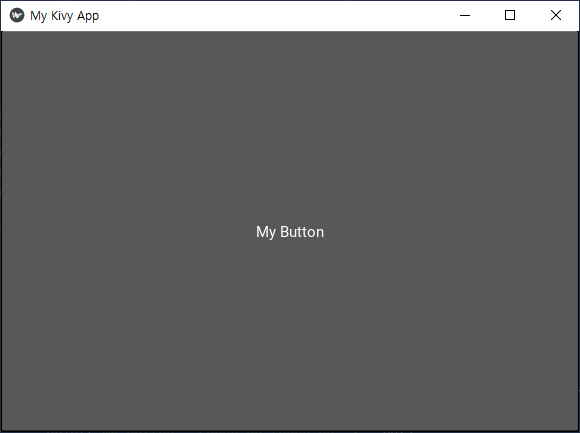
<코드 1>은 touch 이벤트의 몇 가지 프라퍼티를 이용해 발생한 이벤트 정보를 출력한다.
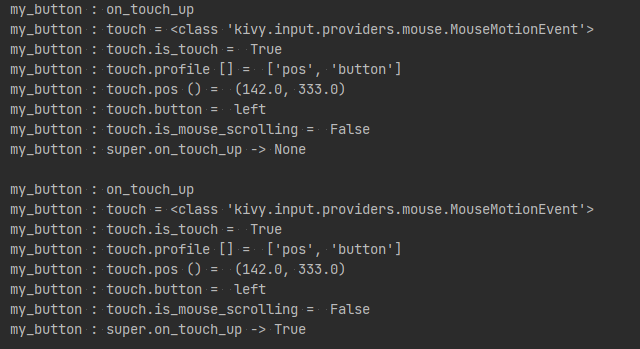
kivy 이벤트 처리의 특성 때문인지 마우스 왼쪽 버튼을 한번 클랙해도 on_touch_up 메서드는 두번 호출된다.
만약 마우스 오른쪽 버튼으로 My Button을 클릭하면 아래와 같이 My Button을 누른 상태가 유지되고 버튼을 누른 위치에 하나의 작은 동그라미가 표시된다.

마우스 오른쪽 버튼 클릭 시 on_touch_up 메서드는 호출되지 않는다.
위 상태에서 마우스 오른쪽 버튼 클릭에 의해 생성된 작은 동그라미를 마우스 왼쪽 버튼으로 클릭하면 My Button은 누르지 않은 상태로 돌아온다.
그리고 개발환경 출력 창엔 on_touch_up 메서드가 실행됨을 알리는 문구가 출력된다.
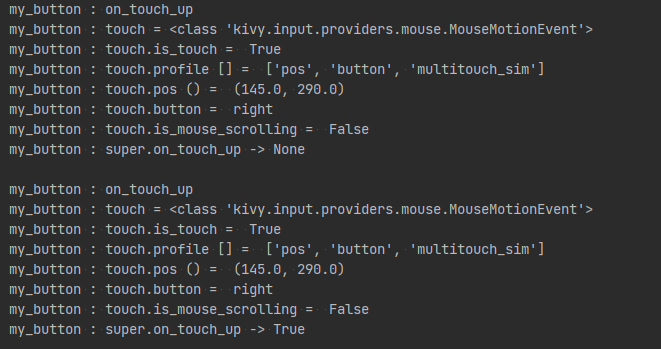
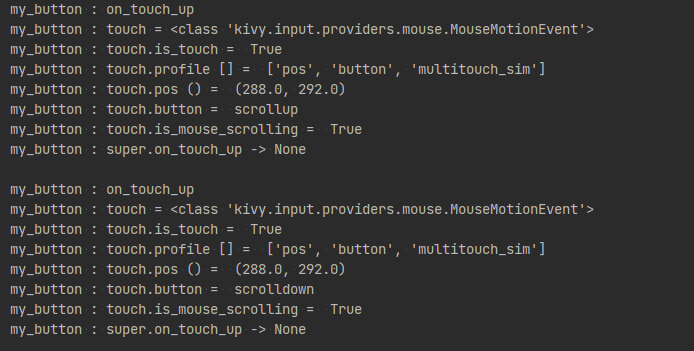
on_touch_up 메서드 고나련 특이점은 마우스 버튼이 아닌 마우스 휠을 움직여도 on_touch_up 메서드가 호출된다는 것이다.
아래는 마우스 휠은 아래로 한번, 위로 한번 움직였을 때의 결과이다.
이전 마우스 버튼을 눌렀을 때와 달리 touch 이벤트 객체 touch의 is_mouse_scrolling 값이 True인 것을 볼수 있다.
다음의 프라퍼티 값 및 메서드의 반환값을 이용해 on_touch_up 메서드 내 원하는 문구가 한번만 출력되도록 <코드 1> 내 on_touch_up 메서드 코드를 수정한다.
- is_mouse_scrolling
- super(MyButton, self).on_touch_up(touch)
<코드 2>
    def on_touch_up(self, touch):
        if self.collide_point(*touch.pos)\
                and super(MyButton, self).on_touch_up(touch)\
                and not touch.is_mouse_scrolling:
            print('my_button : on_touch_up')
            print('my_button : touch =', type(touch))
            print('my_button : touch.is_touch = ', touch.is_touch)
            print('my_button : touch.profile [] = ', touch.profile)
            print('my_button : touch.pos () = ', touch.pos)
            print('my_button : touch.button = ', touch.button)
            print('my_button : touch.is_mouse_scrolling = ', touch.is_mouse_scrolling)
            print()
            return True
이제 아래와 같이 마우스 휠을 조작해도 on_touch_up 메서드는 호출되지 않으며 마우스 왼쪽, 오른쪽 버튼 사용 시 on_touch_up 내 출력 코드는 한번만 실행됨을 확인한다.

touch 이벤트의 multitouch_sim 프라퍼티는 마우스 오른쪽 버튼에 의해 만들어진 작은 동그라미를 마우스 왼쪽 버튼으로 클릭하거나 마우스 휠을 조작할 때 True 값이 된다.
이를 확인하기 위해 <코드 1> 내 on_touch_up 메서드 코드를 아래와 같이 수정한다.
<코드 3>
    def on_touch_up(self, touch):
        if self.collide_point(*touch.pos)\
                and super(MyButton, self).on_touch_up(touch)\
                and not touch.is_mouse_scrolling:
            print('my_button : on_touch_up')
            print('my_button : touch =', type(touch))
            print('my_button : touch.is_touch = ', touch.is_touch)
            print('my_button : touch.profile [] = ', touch.profile)
            print('my_button : touch.pos () = ', touch.pos)
            print('my_button : touch.button = ', touch.button)
            print('my_button : touch.is_mouse_scrolling = ', touch.is_mouse_scrolling)
            if 'multitouch_sim' in touch.profile:
                print('my_button : touch.multitouch_sim [] = ', touch.multitouch_sim)
            else:
                print('my_button : touch.multitouch_sim [] = no property')
            print()
            return True
아래의 출력은 마우스 왼쪽 버튼 한번, 마우스 오른쪽 버튼에 의해 생성된 작은 동그라미를 마우스 왼쪽 버튼으로 한번 클릭했을 때의 결과이다.
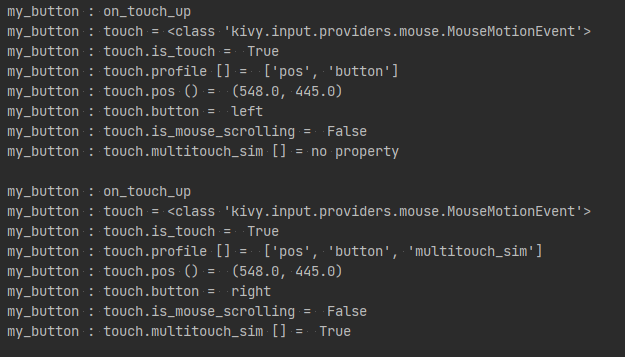
참고
2021.08.07 - [학습 노트/Kivy] - kivy 스터디 013. Kivy Input Management - on_touch_down()
'코딩 > 파이썬 kivy' 카테고리의 다른 글
| kivy 스터디 016. Kivy에서의 Widget (위젯) (0) | 2021.08.22 |
|---|---|
| kivy 스터디 015. Kivy Input Management - on_touch_move() (0) | 2021.08.10 |
| kivy 스터디 013. Kivy Input Management - on_touch_down() (0) | 2021.08.07 |
| kivy 스터디 012. kivy 프라퍼티 이벤트 (property event) - ListProperty 이벤트 (0) | 2021.07.26 |
| kivy 스터디 011. 위젯 이벤트 (widget events) - Button & on_touch_down 메서드 (0) | 2021.07.25 |


