Kivy에서의 Widget (위젯)
A Widget is the base building block of GUI interfaces in Kivy.
It provides a Canvas that can be used to draw on screen.
It receives events and reacts to them.
kivy에서 위젯에 대한 정의는 위와 같다.
kivy에서 위젯은 트리(tree) 구조로 구성되며, kivy 애플리케이션은 하나의 root 위젯을 갖는다.
그리고 root 위젯은 children 위젯을 가질 수 있다.
위젯의 트리 구조는 다음의 3개 메서드에 의해 구성 및 변경될 수 있다.
- add_widget()
- remove_widget()
- clear_widgets()
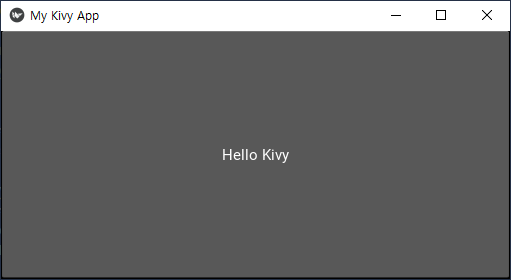
아래의 <코드 1>에서 BoxLayout 위젯을 상속하는 MyRootWidget 클랙스의 객체가 MyApp 애플리케이션의 root 위젯이고, Button 위젯을 상속하는 MyButton 클래스의 객체가 MoRootWidget 클래스 객체의 children 위젯이된다.
<코드 1>
import kivy
kivy.require('2.0.0')

from kivy.app import App
from kivy.uix.boxlayout import BoxLayout
from kivy.uix.button import Button

class MyButton(Button):
    def __init__(self, **kwargs):
        super(MyButton, self).__init__(**kwargs)

class MyRootWidget(BoxLayout):
    def __init__(self, **kwargs):
        super(MyRootWidget, self).__init__(**kwargs)
        self.add_widget(MyButton(text='Hello Kivy'))

class MyApp(App):
    def build(self):
        self.title = 'My Kivy App'
        return MyRootWidget()

if __name__ == '__main__':
    MyApp().run()
kivy의 BoxLayout 클래스나 Button 클래스는 모두 Widget 클래스를 상속한다.
class BoxLayout(Layout):
    -->	class Layout(Widget):
        --> class Widget(WidgetBase):

class Button(ButtonBehavior, Label):
    --> class Label(Widget):
위젯 관련 add_widget, remove_widget 및 clear_widgets 메서드는 Widget 클래스 내에 정의되어 있는 메서드 이다.
def add_widget(self, widget, index=0, canvas=None):
def remove_widget(self, widget):
def clear_widgets(self, children=None):
Widget 클래스의 kivy 프라퍼티 parent나 children을 통해 위젯의 트리 구조에 대해 확인할 수 있다.
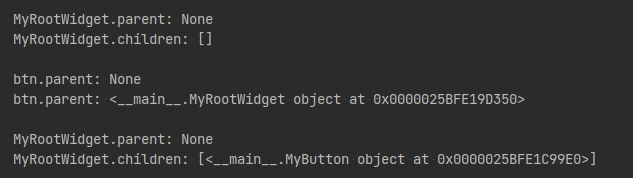
아래의 <코드 2>에서 MyRootWidget 클래스 객체는 MyButton 객체인 btn의 parent 위젯이고, MyButton 객체인 btn은 MyRootWidget 클래스 객체의 children 위젯이 된다.
<코드 2>
import kivy
kivy.require('2.0.0')

from kivy.app import App
from kivy.uix.boxlayout import BoxLayout
from kivy.uix.button import Button

class MyButton(Button):
    def __init__(self, **kwargs):
        super(MyButton, self).__init__(**kwargs)

class MyRootWidget(BoxLayout):
    def __init__(self, **kwargs):
        super(MyRootWidget, self).__init__(**kwargs)
        print()
        print('MyRootWidget.parent:', self.parent)
        print('MyRootWidget.children:', self.children)
        print()
        btn = MyButton(text='My Button')
        print('btn.parent:', btn.parent)
        self.add_widget(btn)
        print('btn.parent:', btn.parent)
        print()
        print('MyRootWidget.parent:', self.parent)
        print('MyRootWidget.children:', self.children)
        print()

class MyApp(App):
    def build(self):
        self.title = 'My Kivy App'
        return MyRootWidget()

if __name__ == '__main__':
    MyApp().run()
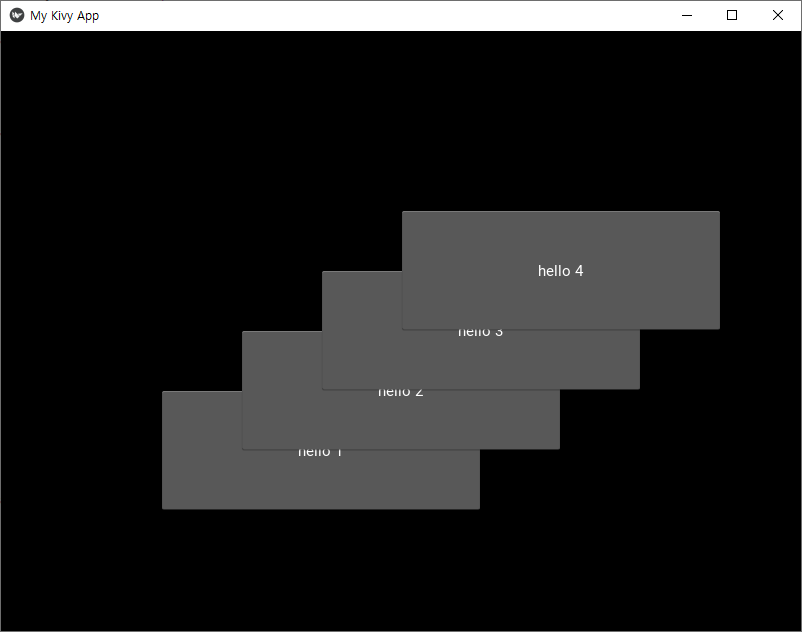
아래의 <코드 3>은 add_widget 메서드로 다수의 children 위젯을 추가하는 예이다.
<코드 3>
import kivy
kivy.require('2.0.0')

from kivy.app import App
from kivy.uix.floatlayout import FloatLayout
from kivy.uix.button import Button

class MyButton(Button):
    def __init__(self, **kwargs):
        super(MyButton, self).__init__(**kwargs)

class MyRootWidget(FloatLayout):
    def __init__(self, **kwargs):
        FloatLayout.__init__(self, **kwargs)
        self.add_widget(MyButton(text='hello 1', size_hint=(.4, .2), pos_hint={'x': .2, 'y': .2}))
        self.add_widget(MyButton(text='hello 2', size_hint=(.4, .2), pos_hint={'x': .3, 'y': .3}))
        self.add_widget(MyButton(text='hello 3', size_hint=(.4, .2), pos_hint={'x': .4, 'y': .4}))
        self.add_widget(MyButton(text='hello 4', size_hint=(.4, .2), pos_hint={'x': .5, 'y': .5}))

class MyApp(App):
    def build(self):
        self.title = 'My Kivy App'
        return MyRootWidget()

if __name__ == '__main__':
    MyApp().run()
remove_widget 메서드를 통해 추가한 children 위젯을 제외하는 것이 가능하다.
아래의 <코드 4>는 두번째로 추가한 위젯 btn2를 제거하는 예이다.
<코드 4>
import kivy
kivy.require('2.0.0')

from kivy.app import App
from kivy.uix.floatlayout import FloatLayout
from kivy.uix.button import Button

class MyButton(Button):
    def __init__(self, **kwargs):
        super(MyButton, self).__init__(**kwargs)

class MyRootWidget(FloatLayout):
    def __init__(self, **kwargs):
        FloatLayout.__init__(self, **kwargs)
        self.add_widget(MyButton(text='hello 1', size_hint=(.4, .2), pos_hint={'x': .2, 'y': .2}))
        btn2 = MyButton(text='hello 2', size_hint=(.4, .2), pos_hint={'x': .3, 'y': .3})
        self.add_widget(btn2)
        self.add_widget(MyButton(text='hello 3', size_hint=(.4, .2), pos_hint={'x': .4, 'y': .4}))
        self.add_widget(MyButton(text='hello 4', size_hint=(.4, .2), pos_hint={'x': .5, 'y': .5}))
        self.remove_widget(btn2)

class MyApp(App):
    def build(self):
        self.title = 'My Kivy App'
        return MyRootWidget()

if __name__ == '__main__':
    MyApp().run()

'코딩 > 파이썬 kivy' 카테고리의 다른 글
| kivy 스터디 018. Widget - GridLayout (0) | 2021.08.28 |
|---|---|
| kivy 스터디 017. Widget - BoxLayout (0) | 2021.08.26 |
| kivy 스터디 015. Kivy Input Management - on_touch_move() (0) | 2021.08.10 |
| kivy 스터디 014. Kivy Input Management - on_touch_up() (0) | 2021.08.08 |
| kivy 스터디 013. Kivy Input Management - on_touch_down() (0) | 2021.08.07 |


