pygame.draw.rect() 함수로 사각형을 그려본다.
본 글에서 사용하는 기능 및 참고되는 기능에 대한 정의는 다음과 같다.
pygame.draw.rect(surface, color, rect, width=0, border_radius=0,
border_top_left_radius=-1, border_top_right_radius=-1, border_bottom_left_radius=-1,
border_bottom_right_radius=-1) -> Rect
pygame.event.custom_type() -> int
pygame.time.set_timer(eventid, milliseconds) -> None
pygame.time.set_timer(eventid, milliseconds, once) -> None
pygame.draw.rect() 함수로 사각형 그리기
<코드 1>
# python 3.9.6
# pygame 2.0.1

import pygame

BLACK = (0, 0, 0)
WHITE = (255, 255, 255)
RED = (255, 0, 0)
GREEN = (0, 255, 0)
BLUE = (0, 0, 255)
YELLOW = (255, 255, 0)


def main():
    pygame.init()

    screen_width, screen_height = (640, 480)
    screen = pygame.display.set_mode((screen_width, screen_height))
    clock = pygame.time.Clock()

    running = True

    while running:
        for event in pygame.event.get():
            if event.type == pygame.QUIT\
                    or event.type == pygame.KEYDOWN and event.key == pygame.K_ESCAPE:
                running = False
                break
        if not running:
            continue

        screen.fill(BLACK)

        pygame.draw.rect(screen, WHITE, [50, 50, 250, 250])
        pygame.draw.rect(screen, RED, [100, 70, 300, 270], 1)
        pygame.draw.rect(screen, GREEN, [150, 90, 350, 290], 4)
        pygame.draw.rect(screen, BLUE, [200, 110, 400, 310], 20, 15)

        pygame.display.update()
        clock.tick(30)

    pygame.quit()
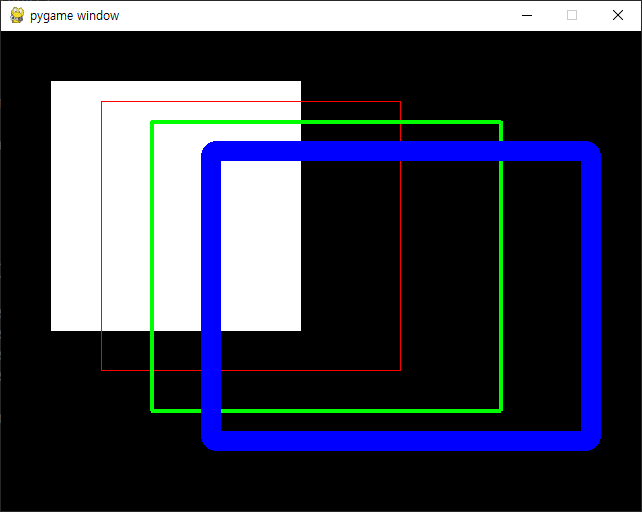
<코드 1>을 실행하면 다양한 모양의 사작형이 게임 화면에 그려진다.
pygame.draw.rect() 함수의 width 파라미터의 값이 0이면 사각형 안쪽은 지정한 색상으로 채워진다.
예제 코드 2
<코드 2>는 pygame.draw.rect() 함수의 radius 관련 파라미터를 사용한 예이다.
<코드 2>
# python 3.9.6
# pygame 2.0.1

import pygame

BLACK = (0, 0, 0)
WHITE = (255, 255, 255)
RED = (255, 0, 0)
GREEN = (0, 255, 0)
BLUE = (0, 0, 255)
YELLOW = (255, 255, 0)


def main():
    pygame.init()

    screen_width, screen_height = (640, 480)
    screen = pygame.display.set_mode((screen_width, screen_height))
    # screen_size = screen.get_size()
    clock = pygame.time.Clock()

    running = True

    while running:
        for event in pygame.event.get():
            if event.type == pygame.QUIT\
                    or event.type == pygame.KEYDOWN and event.key == pygame.K_ESCAPE:
                running = False
                break
        if not running:
            continue

        screen.fill(BLACK)

        pygame.draw.rect(screen, WHITE, [50, 50, 250, 250], 20, 15)
        pygame.draw.rect(screen, YELLOW, [100, 100, 300, 300], 20, 30, 5, 10, 15, 20)
        pygame.draw.rect(screen, RED, [100, 100, 300, 300], 20, 50, 25)

        pygame.display.update()
        clock.tick(30)

    pygame.quit()


if __name__ == '__main__':
    main()
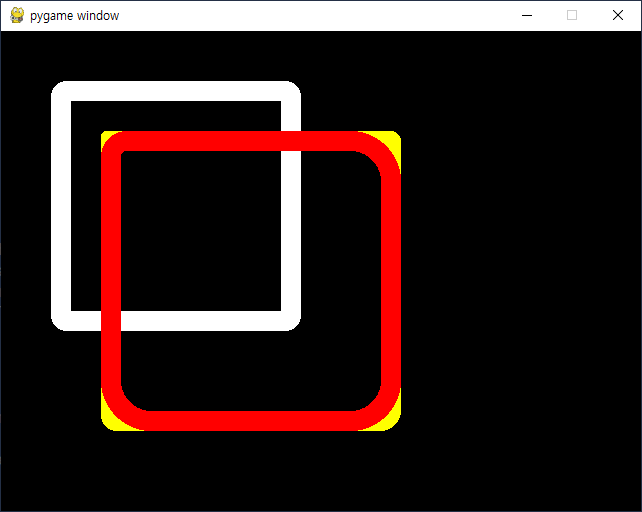
코드 pygame.draw.rect(screen, RED, [100, 100, 300, 300], 20, 50, 25)는 전체 radius를 50으로 설정하면서, border_top_left_radius만 25로 설정하는 코드이다.
예제 코드 3

<코드 3>은 HP가 급속하게 줄어드는 시나리오를 생각해 본다.
<코드 3>
# python 3.9.6
# pygame 2.0.1

import pygame

BLACK = (0, 0, 0)
WHITE = (255, 255, 255)
RED = (255, 0, 0)
GREEN = (0, 255, 0)
BLUE = (0, 0, 255)
YELLOW = (255, 255, 0)


def main():
    pygame.init()

    screen_width, screen_height = (640, 480)
    screen = pygame.display.set_mode((screen_width, screen_height))
    clock = pygame.time.Clock()

    running = True
    HP_DOWN_EVENT = pygame.event.custom_type()
    hp_point = hp_point_max = 492
    pygame.time.set_timer(HP_DOWN_EVENT, 100)

    while running:
        for event in pygame.event.get():
            if event.type == pygame.QUIT\
                    or event.type == pygame.KEYDOWN and event.key == pygame.K_ESCAPE:
                running = False
                break
            elif event.type == HP_DOWN_EVENT:
                hp_point = hp_point - 4 if hp_point > 0 else hp_point_max
        if not running:
            continue

        screen.fill(BLACK)

        pygame.draw.rect(screen, WHITE, [50, 50, 500, 30], 3)
        hp_point_color = GREEN if hp_point > hp_point_max * 0.6\
            else YELLOW if hp_point > hp_point_max * 0.3 else RED
        pygame.draw.rect(screen, hp_point_color, [54, 54, hp_point, 22])

        pygame.display.update()
        clock.tick(30)

    pygame.quit()


if __name__ == '__main__':
    main()
'코딩 > 파이썬 pygame' 카테고리의 다른 글
| 파이썬 게임 011. pygame.draw 모듈로 그외 도형 그리기 (타원, 다각형, 타원호) (0) | 2021.10.03 |
|---|---|
| 파이썬 게임 010. pygame.draw.circle 함수로 원 그리기 (0) | 2021.10.01 |
| 파이썬 게임 008. pygame.draw.aaline 및 pygame.draw.aalines 함수로 직선의 안티에일리어싱 효과 적용 (위신호 제거) (0) | 2021.09.27 |
| 파이썬 게임 007. pygame.draw.line 및 pygame.draw.lines 함수로 직선 그리기 (0) | 2021.09.25 |
| 파이썬 게임 006. pygame.time.Clock 클래스를 이용해 게임 화면이 바뀌는 시간 제어 (1) | 2021.09.23 |


