
JSON (JavaScript Object Notation)에 대한 정보는 json.org에서 확인이 가능하다.
JSON 파일의 기본 구조는 아래의 object와 array로 구성되며,
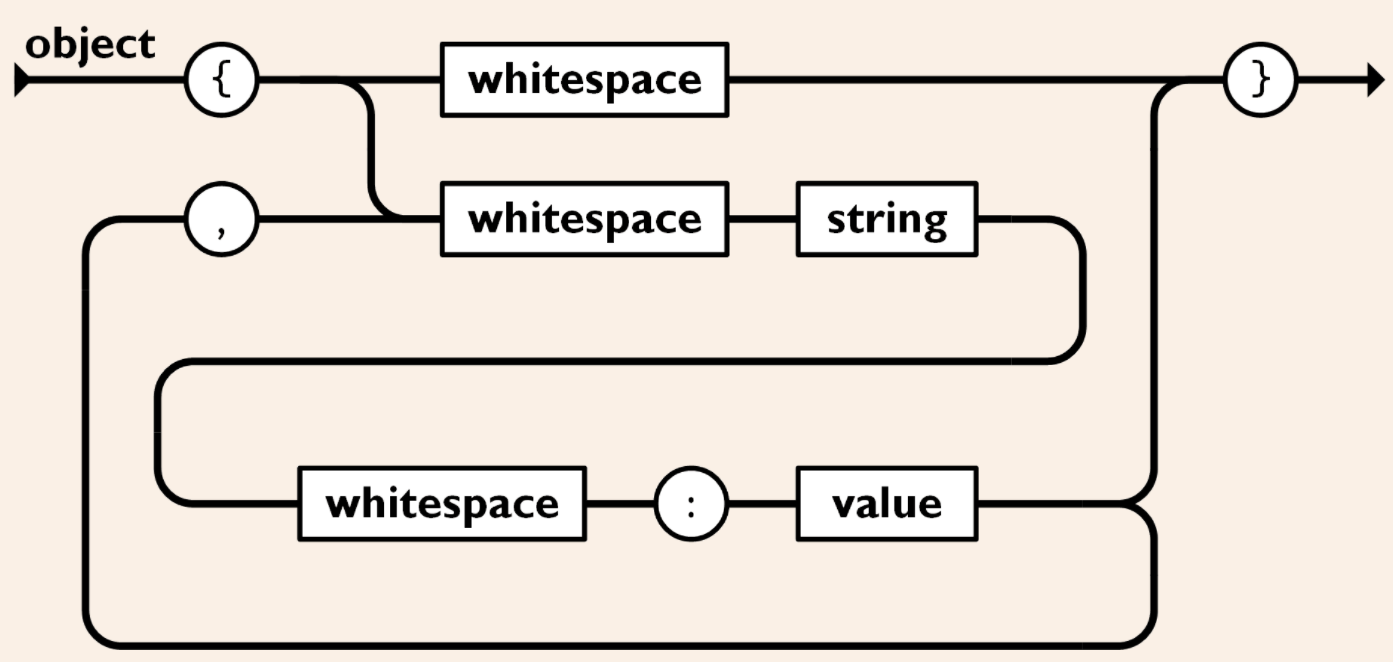
- '{'와 '}'로 구성되는 object
- '['와 ']'로 구성되는 array
JSON 파일의 구성 요소와 파이썬 데이터 타입 간의 관계는 아래와 같다.
| JSON | Python |
| object | dict |
| array | list |
| string | str |
| number (int 또는 float) | int 또는 float |
| true | True |
| false | False |
읽을 JSON 파일이 다음과 같은 경우,
{
    "object": "dict",
    "array": "list",
    "string": "str",
    "number": [
        {
            "int": 1
        },
        {
            "float": 1.23
        }
    ],
    "true": true,
    "false": false
}
JSON 파일의 주요 구성 요소의 데이터 타입을 확인하는 코드를 작성하고 실행하니,
import json

print()

with open('samp_json.json', 'r') as jf:
    jcont = json.load(jf)
    print('jcont type = ', type(jcont))

print('jcont len = ', len(jcont), '\n')

for k, v in jcont.items():
    print('key = {:<10}, value type = {}'.format(k, type(v)))

print()
print('key = {:<10}, value type = {}'.format('int', type(jcont['number'][0]['int'])))
print('key = {:<10}, value type = {}'.format('float', type(jcont['number'][1]['float'])))
결과는 아래와 같다.
jcont type =  <class 'dict'>
jcont len =  6

key = object    , value type = <class 'str'>
key = array     , value type = <class 'str'>
key = string    , value type = <class 'str'>
key = number    , value type = <class 'list'>
key = true      , value type = <class 'bool'>
key = false     , value type = <class 'bool'>

key = int       , value type = <class 'int'>
key = float     , value type = <class 'float'>
json.org엔 JSON 파일 포맷을 그림으로도 설명해 주니 좀 더 쉽게 이해될 듯하다.
'코딩 > 파이썬 표준 라이브러리' 카테고리의 다른 글
| [Python] 텍스트 파일 내용 복사 붙이기 - shutil.copyfileobj (0) | 2021.06.18 |
|---|---|
| [Python][str] startswith 메서드로 문자열의 시작 문자 비교하기 (0) | 2021.05.25 |
| [Python] os 및 os.path로 폴더/파일 관리 (0) | 2020.11.18 |
| [CSV] 6장. 딕셔너리 데이터를 CSV 파일에 쓰기 (0) | 2020.10.31 |
| [CSV] 5장. CSV 파일을 딕셔너리로 읽기 (0) | 2020.10.31 |


